Django开发实战搭建博客项目第 9 篇,缓存的使用。系列文章请查看上面专辑。
对于博客项目中目前的设计,假设每一次去点击博客的分类,都会去分类的数据库中去查询对应的博客分类数据。这样的每次都去查询数据库效率比较低,所以对于一些不需要及时更新的数据,就需要使用到缓存,同时隔一定的时间对相应的缓存进行更新。
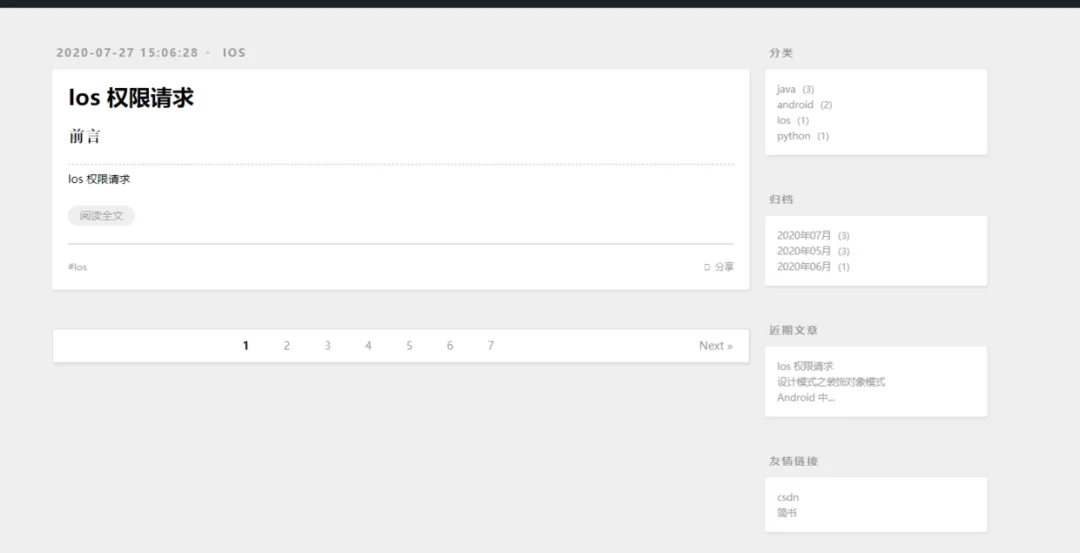
这里对右上角分类模块的请求做缓存处理。
django 中的缓存大致分为全站缓存、views 层级缓存和模板层级缓存。下面对此一一进行分析。
全站缓存:
全站缓存,即对整个项目中所有的请求都进行缓存策略。首先,配置 setting.py 中的缓存中间件配置:
MIDDLEWARE = ['django.middleware.cache.UpdateCacheMiddleware', # 必须放在第一位'django.middleware.security.SecurityMiddleware','django.contrib.sessions.middleware.SessionMiddleware','django.middleware.common.CommonMiddleware','django.middleware.csrf.CsrfViewMiddleware','django.contrib.auth.middleware.AuthenticationMiddleware','django.contrib.messages.middleware.MessageMiddleware','django.middleware.clickjacking.XFrameOptionsMiddleware','django.middleware.cache.FetchFromCacheMiddleware', # 必须放在最后一个]
UpdateCacheMiddleware 中间件需要放在首位最先进行更新缓存,经过了下面的安全认证后,才能够通过 FetchFromCacheMiddleware 中间件获取到这个请求,所以放在最后面。
setting.py 中缓存的相关设置:
CACHES = {'default': {'BACKEND': 'django.core.cache.backends.locmem.LocMemCache',}}CACHE_MIDDLEWARE_KEY_PREFIX = ''CACHE_MIDDLEWARE_SECONDS = 600CACHE_MIDDLEWARE_KEY_PREFIX = 'default'
上述配置表示默认缓存存在本地的内存信息,缓存时间为 10 min,同时指定缓存的 key 为 default。此时则使用了 django 提供的缓存中间件对每个请求进行了缓存处理。
views 层级的缓存:
view 层级中的缓存在 view.py 文件代码中进行实现:
def cache_wrapper(func):def _wrapper(request, *args, **kwargs):# 从缓存对象中获取数据data = cache.get(request.path)# 判断缓存中是否存在数据if data:print('读取缓存中的数据')return HttpResponse(data)# 从数据库中获取数据print('从数据库中获取数据')response = func(request, *args, **kwargs)# 将数据库中查询到的数据存入缓存cache.set(request.path, response.content)return responsereturn _wrapper# 根据类别id查询所有帖子@cache_wrapperdef queryPostByCid(request, cid):postList = Post.objects.filter(category_id=cid)# Post.objects.filter(category__id=cid)return render(request, 'article.html', {'postList': postList})
可以看到,views 层级利用缓存对 queryPostByCid 方法进行了包装。此时我们分别对分类中的第一个分类点击两次,查看对应的输出情况。
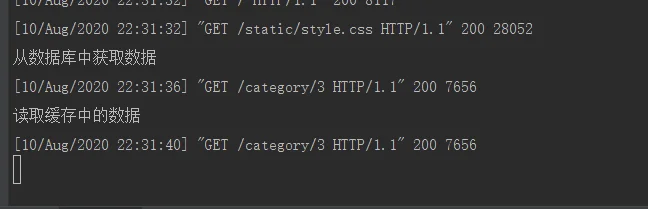
正常进行缓存,后续操作均从缓存中读取信息。对于动态需要及时进行改变的内容这里并不适用。
模板层级缓存
模板层级,即对相应 html 模板进行缓存,这里在 article.html 模板中进行举例。
{% extends 'base.html' %}{% block title %}帖子列表{% endblock %}{% block left %}<div id="main">{% load cache %}{% cache 10000 archives %} {# 这里缓存名称为 archives 时间为 10s #}<div class="archives">{% for post in postList %}<article class="archive-article archive-type-post"><div class="archive-article-inner"><header class="archive-article-header"><a href="#" class="archive-article-date"><time>{{ post.created|date:'Y-m' }}</time></a><h1 itemprop="name"><a class="archive-article-title" target="_blank"href="/post/{{ post.id }}">{{ post.title }}</a></h1></header></div></article>{% endfor %}{% endcache %}</div></div>{% endblock %}
通过在模板中使用 loadcache 标签即相关配置,即在模板层级进行相关数据的缓存。
关注公众号,在聊天对话框回复「博客」获取源码地址。